Showing posts with label technical computing. Show all posts

Saturday, November 20, 2021

Ambiguous Mathematical Expressions Due to Deficiencies and Consequential Inconsistencies of Infix Notation

Introduction

Recently I was searching for information on MS Access SQL to demonstrate that do not need MS Access to create and use MS Access databases, and in particular import text data. In the process of doing so I encountered various youtube videos which were on the wrong track, but finally found the information I was looking for here: Reading Text files into Access with ASP.NET. This being part of a larger exercise in which I will explain why Python/Jupyter is no substitute for Excel/VBA, but is otherwise a useful additional tool.

Any case whilst skimming the youtube videos I bumped into this nonsense:


It is relative clear by clicking "SHOW MORE" that the article is not about mathematics but about marketing and sales of the merchandise listed. The author purports that the correct answer is 24, and presents expression trees to prove his answer. He does not parse the expression given according to the rules of BODMAS or PEMDAS, as these rules are irrelevant to expanding the ambiguous compressed expression into a properly formed mathematical expression.

How a calculator parses such expression is entirely dependent on how the makers of the calculator interpret such expression and write their expression parser. The two calculators the author illustrates are google search and an android calculator, both of which are likely to use an expression parser written by google: therefore not two independent sources and thus bad science.

The correct answer is that the expression is a poorly formed mathematical expression and has no single answer as a consequence. Depending on where you live, the work you do, and your past education, you may consider one answer is more desirable than another: but it does not make it correct. If I have to give a numerical answer to such defective expression then my preference is that the answer is 6 not 24.

More generally we could write the expression has: A÷B(C-D). However since all the programming languages and computing environments I use do not accept the obelus '÷' , and only accept '/', it is also cumbersome using '÷', I will modify the expression to A/B(C-D), where it is assumed that '÷' and '/' have equivalent meaning. That is everything after '/' is not assumed to become a denominator. Also '*' is used for multiplication rather than 'x', though in some environments it is represented by a vertically centred dot '∙' however for simplicity of typing I will use '.'.

Merely Insert a Missing Operator

If you believe the expression is simply compressed by deleting an operator and all that is required is to insert such operator. Then would translate A÷B(C-D) into A÷B*(C-D) , then applying your preferred acronym, this further transforms into (A÷B)*(C-D) , and so get (60/5)*(7-5)=(12)*(2)=24.

This would appear to come from the believe that () means multiply. I would contend that such believe is flawed.

Rules of Compression

However if you have more involved rules of compression then such answer is not acceptable. Now the rules of compression (laziness) I learned, not (BODMAS or PEMDAS), inform me I can express  B*(C-D) as B(C-D). In compressing the expression in such manner the prefixed operand is bound to the contents of the brackets to create an immutable compound expression block, and it is this binding which implies multiplication between the prefix operand and the contents of the brackets. Where ever the brackets go, the prefix follows, that is B() cannot be broken apart: if the prefix operand is separated from the (), then the implied multiplication does not exist. This expression can be further reduced by setting E=(C-D), to give BE, and a step further by setting F=BE, because the block is immutable. Thus the expression collapses to A÷F or A/F. Thus F=5*(7-5) = 10, and A/F=60/10=6. This is otherwise equivalent to: A / (B*(C-D)), that is B() to retain the expression block becomes (B*()).

Now if 24 is the desired answer, then the rules of compression I learned would require the expression be presented as (A÷B)(C-D) in the first place, and it was not. Note the operator which has been eliminated would lie between the two sets of brackets: ()*() compressed to ()(). Therefore the answer 24 is incompatible with the system of rules I learned, as it is not correctly compressed.

It should be noted these rules do not have anything to do with BODMAS or PEMDAS, nor with commutation, association or distribution. The rules are simply a means of compressing formal expressions into a more compact form by eliminating operators, and defining expression blocks. This compression has to be removed before the acronym rules can be applied.

I believe this concept of the expression blocks partially assists with the issues and conventions described in the following paper: Discussions: Relating to the Order of Operations in Algebra on JSTOR. Today it maybe addressed by adding the concept of juxtaposition, and revising the acronym to PEJMDAS, however I don't believe this fully addresses the issues of compressed expressions and other shortcuts in notation. For example () do not mean multiply, only the binding of the prefixed operand implies multiplication: and the binding occurs by removing the operator.

On Notation

I don't recollect being taught anything about juxtaposition, and BODMAS was little needed after moved beyond basic arithmetic. For that matter I forgot what the 'O' stood for and typically considered it was 'of' and didn't know why it was there other than it possibly did connect brackets and multiplication and division. Given it apparently refers to 'orders', then its a very long time ago I ever referred to exponents as orders: as in by grade 12 it was history. Point is generally don't need the silly acronyms, as fundamental requirement is to clearly communicate intent.

None of my text books used inline expressions using '/', so didn't have the problem of a/bc meaning a/(bc). With the increased use of computers, and calculators which accept algebraic expressions, there has apparently been an increase in the use of '/' in textbooks and a decrease in typeset expressions using horizontal lines to separate numerator from denominator.  I generally expect reference books to present expressions in the following manner:


However, I do not expect to write expressions like that myself, as my task is to evaluate the results and make decisions. It is not my task to communicate in detail how I go about reaching decisions, rather it is my task to outline the decision process and present the decision. In other words I don't have to show the expression at all. However, if I am deriving something for the first time, and need to explain my approach then I expect to present the required expressions. For routine design calculations, presenting such expressions is a waste of time and paper, as everyone involved is meant to know the requirements. Also people on the regulatory side of things are meant to be checking my conclusions not my calculations, if and only if we have a difference of opinion, does it become necessary for me to present my calculations in greater detail.

Also, my generation, we wouldn't naturally write a/bc if we meant a/(bc), as we would assume it is ambiguous to others: even though we would expect that bc is a compound or bound expression which should not be split. That is if we intended (a/b) then we would write c(a/b), not (a/b)c, this is not because I consider the latter invalid, as expect such results when manipulating expressions, it is just convention to prefix the () with a single operand, not postfix.

The other issue with a/bc is whether or not 'bc' is a single variable name or two variables multiplied together. In mathematics and physics we tend to only use single character variable names, but in other areas, two or more characters are used for variable names {which off the top of my head I cannot remember any, but they tend to be from accounting and economics}.

So if want to clarify that bc is two variables and not a single variable name, would use dots as multipliers, so would write something like a/b.c. Now have a problem because b.c is no longer a bound expression, and would most likely translate as (a/b).c

When using programming languages, whilst most of the time we can use single character variables, it frequently becomes preferable to use multiple character names to help distinguish one variable from another. For example, σ is frequently used to represent stress and also standard deviation. So first problem is most programming languages do not support Greek characters, so would use the English name, 'sigma', now it doesn't make sense to use the name 'sigma' for everything, when we can equally well use the name 'stress' and 'stddev' to more properly distinguish the two variables.

Another point is that subtraction is the inverse of addition and division is the inverse of multiplication. That multiplication is just a shortcut notation for repeated additions, and exponents are shortcut notation for repeated multiplications. So most expressions or standard formulae are based on addition and multiplication, and we substitute negative numbers and fractional numbers into such formulae.

Expression1: A÷B(C-D) becomes A*(1/(B*(C+(-D))))

and thus we seek shortcut notations, to compress such expressions.

For those who seem to mindlessly and bombastically regurgitate the rules of PEMDAS, why for example would I need such a rule to evaluate 3+32 ? Why would I translate it into 3+3*3=(3+3)*3 ? Clearly I cannot add anything until I know the value of 32. Similarly I cannot proceed with anything until I have evaluated the contents of brackets, and I cannot add products and quotients to anything until I evaluate them. It would seem that school book exercises are silly exercises in mindless application of silly rules, to deliberately misleading expressions. The poorest of education failing to explain the complexities of the real world.

“Rules are for the obedience of fools and the guidance of wise men.”  - Douglas Bader

Other Notations

Consider this usage in construction 2/M16-8.8/s bolts, or 2/90x45 F7 studs, in both instances the '/' means multiples of that which follows, except where it is just a separator of characters. Further more 90x45 is a compound expression, defining dimensions of a rectangular section. And '-' does not mean subtract, it is simply a separator of characters.

Or another example: Buildex 12-14 x 20mm Hex Head Metal Tek Screws, in neither case are '-' and 'x' really arithmetic operators. It describes a Number 12 or #12  or No.12 screw, which is the gauge size of the screw and gives its diameter, whilst 14 concerns the thread, and gives the threads per inch and 20mm is the length. {Wouldn't want to confuse anyone with consistency now would we?}

Deficiencies of Infix Notation

Now the rules of mathematical expression we use are clearly inconsistent. We use infix notation for the arithmetic operators [*,/,+,-], but we do not use infix notation for other operations.  For example what does sin() mean? Does it mean multiply the variables 's', 'i' and ''n' by the contents of the brackets, or is it an abbreviated function name for sine? And what about sinθ, and 2sin2θ, now have missing operators and missing function parameter brackets. Then there are rules for exponents, which also do not follow infix notation. The context and intent of the author of the expression needs to be understood. But such inconsistencies are not necessary.

Calculators

When I was at school, the expectation was we would be taught how to use a slide rule, however when we arrived at that year they changed to teaching the use of calculators.

The primary calculators chosen were supposedly algebraic logic calculators (AL), though there were two variants of such. I can't remember the difference between the two, though I believe it had to do with the inconsistencies of infix notation and how the calculators accepted input for those operations which do not follow infix rules: for example exponentiation, trigonometry and logarithmic functions and the likes were handled differently. There were recommended calculators, but these were not mandatory. So not all students had calculators which used the same system.

I especially didn't as I used an HP RPN calculator. Use of this type of calculator was not being taught, but I was allowed to use, and I was responsible for learning so. It was common for students to argue about who had the better calculator on the basis of the number of levels of parentheses it allowed, the more the better. My calculator had zero parentheses. Besides this causing problems for people borrowing my calculator, there was also no equals sign, they would go away and come back a few minutes later asking where the '=' was. I would explain there wasn't any, and that would cause confusion

It is also interesting to note that HP handbooks explained the use of the 4 register stack (XYZT) which it used, whilst handbooks for other calculators did not explain the operation of their 2 register stack (XY) which they used. It is the operation of the stack which removes the need for parentheses and '='. 

Calculators which allowed algebraic expressions were not available, so all calculations required transforming expressions prior to input to the calculator. So calculators did not give the incorrect answer for an algebraic expression the user of the calculator transformed the expression incorrectly, with respect to their local conventions.

I don't currently have access to an operational HP calculator. However the computer based calculator Calc98 can be operated in RPN mode. To use such a calculator each number has to be entered onto the stack using the 'ENTER' key, to keep the notation simple I will just use ',' to separate the numbers, also Calc98 has a 10 element stack.

Expression1: 60,5,7,5 -*/ gives 6
Expression2: 60,5 / 7,5 - * gives 24

An alternative notation would be to reverse the prefix notation of the programming language LISP. Now I've never been able to install and get common LISP working on my computer, so I cannot run the expressions in a simple LISP environment, I do however have IntelliCAD LISP available, so I could check the following two expressions.

Expression1: (/ 60 (* 5 (- 7 5)))  gives 6
Expression2: (* (/ 60 5) (- 7 5)) gives 24

and reversed

Expression1: (60 ( 5 (7 5 -) *) /)  gives 6
Expression2: ((60 5 /) (7 5 -) *) gives 24

However with a traditional HP RPN calculator it is likely necessary to use an X and Y register swap function, which I will simply call xy. This is required as the numbers have to be keyed in order, and the stack is limited in size.

Expression1: ((( (7 5 -) 5 *)  60 xy) /)  gives 6
Expression2:  not required ? {checked with HP21 simulator on android phone}

Whilst LISP is an abbreviation of List Processing, it is commonly derogatorily referred to as: lost in stupid parentheses. Depending on how the notation is used for prefix or postfix notation the expression may have zero parentheses or be drowning in them. However the notation is generally consistent: there is no alternative notation for functions or exponents.

On the other hand whilst it provides consistency it is probably cumbersome to use, but maybe not once it becomes second nature. RPN does seem more natural when just doing simple calculations. Natural in terms of start with some numbers which then need to be operated on in some manner to produce the desired result.

Expression3: 100[apples/barrel], 50[barrels] * gives 5000 [apples]

Programming Languages and Computing Environments

So I took a look at the various computing environments and programming languages I use, though I ignored compiled languages and only used interpreted languages. I didn't really need to, I was fairly certain before hand that all the languages would not allow the original expression: A÷B(C-D) nor allow the modified expression: A/B(C-D).
  1. ATCalc : invalid expression
  2. Freemat: invalid expression
  3. Scilab: invalid expression
  4. Python :  invalid expression
  5. MS Excel: invalid expression

 All of these required the missing operator to be supplied before they would accept the expression, and therefore the expression is considered ambiguous and needs to be clarified by the user. Thus need to chose whether intent is: A/(B*(D-C)) or (A/B)*(D-C).

The VBA editor attached to MS Excel was interesting. If type ? A/B(C-D) into the immediate window, it returns 12 and 2. If create a program module, and add subroutine and type debug.print A/B(C-D), then this is modified to debug.print A/B; (C-D). In other words, autocomplete assumes it is two separate expressions. If attempt to assign the expression to a variable then get a syntax error, a properly formed expression is required.

Using windows scripting host (WSH) and vbscript, the expression is also identified as an error. I was unable to test JScript as the engine appears to be no longer available on my machine. Tests in Powershell flag the expression as invalid.

In other words to the authors of such software the expression is an incomplete and ambiguous statement. Simply stuffing an '*' operator into the expression before the opening brackets is unlikely to give everybody the desired result.

Speedcrunch was the only application tested, which did not flag the missing operator as an error. However it calculated 60/5(7-5) as 60/(5*(7-5)) = 6: works for me, but not for those who expect otherwise.

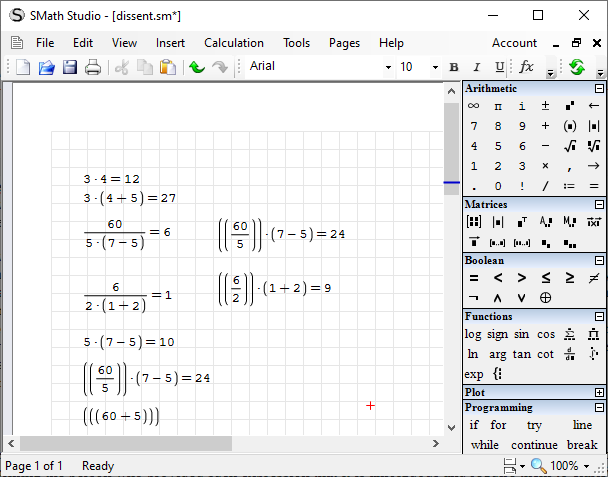
Now SMath is different. It simply won't allow the original expression to be written, it has to be translated by the user, and gets presented in more traditional typeset notation. As soon as type '(' after '5' it inserts a multiplication symbol, which it displays as '.' {actually a vertically centred dot} , whilst otherwise requires '*' to be typed to use multiplication. As soon as type '/' it creates a quotient with numerator and denominator. So 5(7-5) becomes the denominator, 5.(7-5)=10, and the over all result becomes 6. The user has to translate the expression, to clarify their intent. If after typing 60/5, move the cursor and type '(', it simply wraps 60/5 in brackets, thus get (60/5), if type again will get ((60/5)). To move on it is necessary to provide the missing operator, '*' then '('.  Then we can get (60/5)*(7-5)=24.
Experiments using SMath


The gist is that the tools I use would basically require the formula be translated, and I would start by informing the person who provided such expression that it is ambiguous and require them to clarify their intent. For that matter depending on the source of an expression, I wouldn't even rely on BODMAS  being universally understood throughout our community, and would request the supplier to clarify their intent by use of brackets. Once intent has been communicated then I, we can be lazy and remove redundant brackets to calculate the desired value.

Other Environments

As mentioned near the beginning google search and the calculator on android can evaluate the expression: 60÷5(7-5) and return the value 24. An answer which is only acceptable to some. It is also advised that wolfram alpha can also understand the compressed expression and returns 24. This doesn't make the answer correct, it just means the authors of the software have adopted one means of translating the compressed expression. Wolfram appropriately explains its interpretation of various algebraic expressions as it otherwise returns unusual and unexpected results.

It is fundamental to human machine interface design, that the machine augments human ability and assists avoidance of errors. Clearly if software returns a result which is not expected and have to adapt human behaviour to suit the software then the software is an hinderance and impedes human ability rather than assists, and further more the software contributes to the generation of errors.

It is thus likely that wolfram software is little used in some areas for reasons other than its high price, if it does not produce commonly expected results. If to use the software people have to adjust their behaviour to how the software works, then there is a danger that when people are under pressure that they will revert to that which is most natural and produce serious errors.

Expression Parsers

I don't know much about parsing expressions, other than a little bit I read in a book on an introduction to programming in C, and some computer science books using Pascal. Basically behind the scenes the parsers use one or more stacks. A stack of numbers and a stack of operators. So as the string expression is read from left to right, numbers are pushed on the stack and operators on the other, if the stack has enough numbers for the operator, then numbers and operators can be popped from the stack, the calculation performed and the result returned to the stack. Since stacks can be used to parse trees, the mathematical expression can be represented by an expression tree. However it isn't necessary for the parser to transform the string expression to a tree, and then process the tree with a stack if it can process it directly with a stack. In effect the parser transforms the infix expression into an RPN expression and evaluates.

Now infix notation for the arithmetic operations [*/+-] have some level of consistency, the introduction of all the inconsistencies of our actual notation makes the parsing of the expression vastly more complicated. 

The point is someone has to design and implement an expression parser, and some expressions are easier to parse than others, and similarly convert and evaluate a result. But first of all they have to decide on a consistent set of rules. Most programming languages do not allow compressed expressions, all operators have to be explicitly given: this thus requires the user of clarify their intent, whilst otherwise simplifying the rules the parser has to implement.

The real world is messy.


Additional References


Related Posts

Revisions:
[(20/11/2021) 17:41] : Original
[(21/11/2021) 01:27] : Expanded
[(21/11/2021) 18:12] : Expanded/Rewrote + further references

Sunday, October 02, 2016

Hypothetical for Microsoft and other Software Companies

Since my Windows XP computer died, I have been finding using a computer more and more irritating, everything seems to be going backwards. The same goes for digital TV: analogue TV was getting close to perfection, so it seems someone decided to break it by cutting the analogue signal and forcing everyone over to unstable and less robust digital TV broadcasts. I say less robust because when an analogue signal is poor, still likely to get a snowy picture and gain some information. When a digital signal is poor, then get pixelated garbage. Digital TV was imposed by government without any democratic vote on the matter. It however is an infrastructure issue. Computer hardware and the software that runs on it, however is not an infrastructure issue. There is no good reason to remove one technology from the market and replace it with an alternative.

As I have mentioned previously the different versions of MS Windows are not upgrades, they are different products. If the software that I had running on Windows XP will not run on Windows 7 or Windows 10, then it clearly is not an upgrade. If the user interface changes and operation changes then its different not an upgrade. A power driver is not an upgrade of a ordinary screwdriver, it represents a single optimised function and single capability of an ordinary screwdriver. A power driver is less useful than an ordinary screwdriver. Likewise as another example a nail gun is not an upgrade of a hammer, it also is less useful than an ordinary hammer.

So my problem. My hardware fails, and my software is locked by OEM licensing to the failed device and I cannot get new hardware with required operating system. More importantly two of main software packages won't install or run under Windows 7 or Windows 10. I went with the upgrade to Windows 10, as I didn't like Windows 7 and my software didn't work anyway.

Proposal 1

If buy hardware from same manufacturer, then OEM license permitted to transfer to new hardware.

Proposal 2

Microsoft releases a new operating system, which contains pre-installed virtual boxes for all its previous operating systems.

Proposal 3

Microsoft releases Windows XP and Office 2003 under a GPL or similar license.

As far as I'm concerned this software worked perfectly fine out off the box. If a computer virus is something which interferes with and hinders being able to use a computer as intended: then Microsoft automatic updates are a computer virus. A computer does not need to be connected to the internet. Computer software does not need to be updated on a regular basis. Most people are not computer geeks or technology geeks, they are not waiting for the latest release, and they don't care about some tweak discovered by some geek. In the main they just want to get on with what they were doing or are doing. To have computer resources suddenly tied up by updates is not acceptable. To be unable to carry out a simple lookup on the internet because updates are being downloaded and consuming data allowance is not acceptable.

I understand, need to protect copyright, and need to keep selling something to make a living.

But here's the thing. Windows XP is massive operating system, compared to CPM/80 on a 360 kbyte floppy disk, or MS DOS on a 720 kbyte floppy disk. When I started using computers I would have liked a Unix based machine, but it required a massive 20 Mbytes for a full install: that was the size of the average harddisk on a PC, so no where for data. Now people are trying to get Linux installations down to 100 Mbytes: such as damn small linux or puppy linux. These still have graphical user interfaces: so what is all the stuff in Windows XP? Unix was once desirable because it was the main operating system for scientific and engineering software. Now most such software is written for MS Windows, that which is available for Linux is incomplete or typically cumbersome to use.

Windows XP doesn't even have to be released as open source. The source can be protected. The main requirement is that can modify the system and can distribute the modifications: and do not require the source code to do that.

The first variation that is likely to arise is reducing the system size, and making it modular. Delete everything that is unnecessary on a stand alone PC which is not networked and does not have internet connection. Rip the system back to launching a simple command prompt, and having no more capability than a old MS DOS bootable disk. Then have separate installers for adding extra capabilities. My current Windows 10 folder is about 34.8Gbytes . Now I don't know how much of that is unneeded remnants from Windows 7, or how much is due to low quality software dumping files in the Windows folder because the software developers haven't figured out the fundamentals of their software finding itself. It does however seem excessively large.

A personal computer should be simple enough that a user can explain the presence of every file and folder on that computer. If they do not know what it is, then they should be able to delete it. If not then the file doesn't belong their. The operating system may belong to Microsoft, however the computer belongs to the user. A company has no right to be modifying the contents of a personal computer, and certainly no right to be recording history in typically hidden folders. The history typically has no value to the user: it is not like they can retrieve the data and then invert every command issued to undo something that went wrong. I probably open about 100 or more files every day: the recent file list is of no use to me. Now whilst its display can be switched off, it doesn't stop the system recording and wasting hard disk space. How many people have bought new computers because they are unaware of how much junk the system and other software produces in the background?

As I recollect Windows XP was around 1 to 2 Gbytes, and I didn't and don't need all its capabilities. So what is all the stuff required by Windows 10? Its graphics have been deteriorated, so that not as clear where one element starts and another ends. Office 2016 seems unstable, with displays becoming split or distorted. Plus Office 2016 doesn't seem to like file association, it typically generates an error when attempting to open a file the first time. Loss of multiple document interface (MDI), single container for Excel is also a backwards step. It is more inconsistent now than when had MDI. With MDI can organise files inside Excel without messing desktop organisation of other applications. Whilst it may be possible to organise the Excel files separately than other applications, its necessary to remember that some of those Windows on the desktop belong to one application, and only want to arrange them, so don't arrange the desktop, arrange from within Excel. Even so there is still loss of control over the size of workbook Windows. Multiple workbook and multiple Window Excel applications become inconvenient. I'm not convinced that the UI/UX professionals really have any understanding of human behaviour.

Whilst LibreOffice is useful, its spreadsheet application is no where as convenient to use and automate as MS Excel 1997. However the primary requirement for a computer user is that files created yesterday can be read and edited tomorrow. Having standards for data exchange is important. Such standards should be flexible enough that content can be added or deleted without causing the readers and writers to crash.

The difference between AutoCAD and AutoCAD LT is that the LT version cannot create or edit certains features of a drawing: however it is able to either display those features or identify that they exist but cannot be displayed. The file can also be edited without loss of those features.The difference between AutoCAD and IntelliCAD is that AutoCAD commands typically execute faster and screen displays update correctly, thus providing proper feedback to  the user. So IntelliCAD maybe able to open the drawing files, and it maybe lower priced, but its operation is less user friendly. However, interacting with software tends to be wasteful compared to automating that software: and if objective is to remove or minimise human interaction, then the automation capabilities of IntelliCAD make it a suitable substitute for AutoCAD. However parametric CAD is still less time consuming and more flexible than automation and parameterizing via a general programming language.

Now whilst Microsoft and Autodesk both acquired a dominant position in their respective markets, they cannot maintain that dominance with their current product offerings. The population at large does not need nor want the current product offerings. It was important that Ford only offered black cars, so as to make cars affordable to the public at large. But now that the basic need has been essentially saturated in the industrialise west, cars need to be produced in smaller batch sizes to meet niche markets. Likewise mobile phones cannot be sustained on an assumption of a consumer market with regular updates of new models. Most of the capabilities of mobile phones are gimmicks: junk with no real long term value to the end users. However having put capability there, it is not acceptable to abandon such feature in future releases and leave some people stranded.

Whilst there may occasionally be issues associated with infrastructure and connectivity, the primary issue is loss of capability when modern technology is used in its stand alone isolated mode. A pocket calculator is still faster and more reliable than a mobile phone or desktop computer. However a computer has the potential to replace the 1000 or more books I own, and take up considerable less space. More over a computer can do this without need to be connected to the internet. The internet of things at this point in time is more gimmick than anything useful. Most likely fueled by TV shows and movies which show unrealistic capabilities of computers. Computers cannot break the laws of physics. Control requires more than simply connecting sensors, it requires electric motors attached to the equipment, and motors require a power supply. Rather than electronic sensors reducing maintenance costs of remote equipment, it is likely to increase the costs: as the robust mechanical equipment which only occasionally needed maintenance is now appended with fragile electronic junk. The internet and the web does not equate to technology.

[Case in point. Around 15:30 blogger has problems automatically saving work, but manual saving works for a time. Then saving hangs. I can copy the post to clipboard. But Notepad won't open, so cannot save. Task manager also doesn't open: not sure about the point of a task manager that is resource intensive and frequently fails to open. Switch power off, and reboot. Check power off settings: can shutdown and install updates or restart and install updates. Either way no choice about accepting updates. So basically can attribute the source of the hanging being updates hijacking web resources and other computing resources. So decide to restart with the updates: 17:42 computer reboots, I think its the final reboot, but no: its still only 75% way through. 18:11 get to log back on and it says "Hi". Are you kidding me! You effectively hijack my computer, to make changes I didn't ask for, and waste my time and consider you can be jovial about it. 18:20 can actually do something with the computer: with my computer.]

So if Windows XP and Office 2003 are considered too old to support then release them to the community to support. I'm reasonably certain that they will rip it back to the absolute minimum install. As for the internet it has very little to do with computing, so develop it without messing up the systems used for computing.


Related Posts

Revisions:
[02/10/2016] : Original

Friday, January 03, 2014

I Believe there is a Need to Define the Concept of Software Upgrade

An issue I have with software companies is that what they call upgrades are light years from being upgrades. There should be some peoples law which defines an upgrade. Changing any of the following breaches the concept of upgrade:

  1. File format
  2. User Interface
  3. Reports generated

If I cannot generate the same reports with the software, then it is clearly a different product: the output expected from the product is no longer there and therefore it is clearly different. So if have engineering, accounting software or similar and the developers change the reports, then they have changed the product. If they retain the original reports and add more reports then can consider it to be an upgrade.

If the old program cannot read the file of the new program then its not an upgrade its a change of product. The file format should therefore be designed so that additional data can be added in future. Whilst the file parser/reader should be designed so that it can read what it needs and ignore the rest. Similarly the file writer should be designed so that it can update the data it uses, but otherwise doesn't touch and retains the data it doesn't use. Most old software isn't written such way, and therefore changing the file format would result in a change of product not an upgrade.

Changing the user interface is clearly a change of product. Replacing the popup menus with a ribbon bar, is not an upgrade. Changing the locations of commands in a menu is not an upgrade its a change of the product. Increasing necessity of a mouse and removal of keyboard commands is not an upgrade. Removing commands, renaming commands, none of this represents an upgrade.

Any change which results in a learning curve to get back up to speed with using the software is a change of product not an upgrade. The learning curve should only be for new features, and if don't need them don't need to upgrade, and don't need to learn how to use them.

FreeDOS and USB Flashdrive on Asus EEE PC Netbook

On attempting to get the USB flashdrive to work on my netbook, I read several websites about various drivers the most useful articles being:


  1. DOS USB Drivers (At BootDisk: a useful site for information about booting DOS and/or windows from CD's,to fix problems)
  2. Yes, there are USB drivers for DOS... (From FreeDOS site itself)
  3. Run USB devices under DOS! (TechSpot Forum: From memory where I actually got the drivers from, most other sites had dud links.)
  4. Bret Johnson (A collection of programs for working with USB's at DOS, and extensive documentation of USB technology. Though no quick guide, or example Autoexec.bat and config.sys files.)
  5. USB Made Simple (For those interested in the electronics)

I started out with what appeared to be the simplest and most common appoach of using the seemingly universal Panasonic drivers. It didn't seem to work, but then too many other variables to get a clear check on things. So I decided to take the plunge and start reading Bret Johnson's 186 page document, plus randomly typing commands into DOS with the help switch option, or simply running and waiting for the complaint, then go read the instructions. Actually no real instructions. I opted for putting the following at the end of my autoexec.bat file:

USBUHCI
USBDRIVE

I'm not sure if USBUHCI should be in config.sys. It seemed to work but not consistently. First boot and my drive was E: and a second boot and drive was F:, boot again and back to E: and so forth. However messing with USBHOSTS and DRIVES, I decided I was probably wasting my time.

Wasting my time, because I was starting to get the impression that none of the drivers were actually doing anything. One of the problems is that when the netbook boots most of the information it displays flies off the screen fairly quickly. However, just before disappears off the screen do get to see that it finds either the USB flashdrive or the extrenal USB CD ROM drive if plugged in. I can boot the computer from either.

Actually that was a problem. A while back I downloaded FreeDOS and burnt the ISO file to CD. This time round I downloaded the FreeDOS ISO file and used Rufus to create a bootable USB flashdrive. Problem was that even though can boot from the flashdrive, the installation expects a A: floppy disk drive: so doesn't install. The result I installed the older version of FreeDOS from the CD. Didn't have that problem with Ubuntu, I installed from the flashdrive.

Any case I can boot the flashdrive and work from it. So using my MS Windows XP machine I created a new bootable FreeDOS stick using Rufus, with minimum requirements. That booted and provided access to the two DOS partitions on my harddrive: further more it didn't complain about the partition, as I described in earlier post. This I guess is because the memory stick, was now the C: and the partitions were D: and E:. So it appears it could be a boot sector problem.

Booting from the flashdrive (I prefer memory stick, mainly because I thought flashdrive was one specific brand), I got a nice clean display of all the drives recognised when FreeDOS booted: not cluttered by error messages.

So my next exercise was to disable the autoexcec.bat and config.sys files on my harddrive and boot from the harddisk. Didn't seem much of a problem, as I don't know what most of the rubbish in these files is for anyhow: I'm guessing mostly only of use by those who want to play old DOS games. So all up not having my display cluttered with error messages about stuff I don't have nor need was a good thing. The system thus booted ok, with just the message about the bad partition.

Next thing was to plug in a non-bootable memory stick, and reboot from the harddisk. As expected the computer found the memory stick. Since my harddisk is partitioned I was expecting the harddisk to be C: and D: drives. However the memory stick became the D: drive and the second harddisk partition the E: drive.

Still its something I can work with. As to why it was not apparent in the first place, I guess that is because the memory stick I was using, was set up to be bootable, therefore I removed it from the drive when booting from the harddisk. The flashdrive /memory stick needs to be plugged in at boot time for the computer to find it.

Having to plug the memory stick in, at bootup is not a problem for me: I only have simple uses for a fast operating system. For some people it may be a problem, and the computers ability to find the flashdrives may be a problem if using drivers, Bret Johnson's document provides some trouble shooting guidelines if have such problem. Its how I decided that may be I didn't need any drivers and I was potentially wasting my time trying to get such to work. {With approach adopted I don't need any third party drivers, and therefore no licensing issues.}

I started out using an old 128Mbyte flashdrive, then I setup a 2Gbyte flashdrive to boot to FreeDOS. Given my intended use of FreeDOS either of these flashdrives is plenty big enough to work from without need to setup the computer harddisk.

Tuesday, December 31, 2013

FreeDOS and Ubuntu on Asus EEE PC Netbook

Accidentally killed MS Windows XP on my netbook. Used Partition Magic 8 to create partitions on my Netbook. All seemed to be going fine, then turned out that it wasn't. I got the netbook a while back now, the general idea was hopeful expectation that it would boot faster than Windows XP laptop, if it didn't then I would install MS DOS (Assuming I could figure out how to get around it being on 3.5" floppy disks) At the time I downloaded FreeDOS and Unbuntu for netbooks, but never got round to installing. Though I did burn CD's and otherwise load Ubuntu onto a bootable usb memory stick/flashdrive which was useful for fixing MS Windows problems. Also at the time I managed to network the netbook with my laptop share the laptop CD drive and install Powerquest Partition Magic on the netbook, though Bootmagic didn't seem to install. Any case problem was only allowed to have 4 primary drives and the netbook already had so I didn't pursue any further: primarily because have no Windows XP disks to re-install the system. On top of which at the time didn't fully understand how to get the system back without installation disks: it seemed like needed to install over Internet or something. Instructions didn't seem clear, and I didn't have time to pursue further.

So this time round I took a closer look at the partitions and identified one of them as the recovery partition for Windows XP, this was after I removed its hidden status with Partition Magic, and rebooted and could see in windows explorer. After which I discovered I could have probably browsed the files in Partition Magic. Any how I proceeded to remove the 4 primary drives and create a single primary partition and an extended partition. In the extended partition I then set up swap partition and ext2 partition for Linux. That all seemed to go fine. I then installed Ubuntu netbook edition from the usb drive. That all seemed to go fine too. The grub bootloader was automatically setup, and allowed booting Windows XP, Ubuntu, and also the Win XP recovery drive. However I didn't like the Ubuntu netbook edition, as none of the user guides I could find gave instructions which matched the Unity desktop it used. For that matter one guide discussed a gnome desktop.

I did also install both FreeDOS and Ubuntu netbook edition in virtual machines on my 64 bit laptop using Oracle Virtual Box. It seemed to go fine. For that matter Ubuntu in the virtual box made a connection to the Internet and spent an hour or more downloading and installing upgrades. I thought these upgrades would change the desktop to match the more recent user guides but it didn't. Installing Ubuntu 12? into virtual box didn't go so smoothly. But then virtual box wanted to update. After Virtual Box update, and allowing more ram for Ubuntu the installation, with power supply, and Internet connection, the install went more smoothly. I also tried the 64 bit version of Ubuntu, that wasn't compatible. So things went relatively ok in virtual box: only problem with respect to FreeDOS was how do I get files and other software into the virtual machine. That seemed somewhat complicated: further no real value to using FreeDOS inside a virtual box under MS Windows 7. The real objective was to boot my netbook fast and otherwise install Turbo C and Turbo Pascal along with maybe Paradox, and take a look at some of my old programs. {As there are some memory problems running at the Windows Command Prompt}.

The real objective a fast DOS box for writing and number crunching: don't need all the fancy graphics, my HP 28S calculator doesn't have such. Switch a calculator on get straight to crunching numbers, switch a word processor on get straight to typing. Switch a Windows computer on, get straight to no where: all that power and flexibility is good but its not always appropriate.

So creating another partition for FreeDOS on my netbook was the next task: that's where I hit problems. Partition magic would no longer start, complaining about drive assignment. I ran Ubuntu from the flashdrive again and went through the install, its partitioner indicated that none of the drive was allocated.

I then downloaded and installed GParted on a Live CD. I ran that but had problems, didn't seem to have any touch pad or keyboard control: touch pad could move cursor but couldn't execute any commands or select anything. After booting and trying a few times, eventually it worked with mouse plugged into usb port. It confirmed that none of the drive was allocated. Hunting down this problem, seemed that the partitions overlapped or something similar. So whilst XP and Ubuntu didn't seem to mind, and seemed to run ok, the disk partitioner didn't like. I ran a program called TestDisk, that seemed to identify the problem, and could apparently fix the problem. That is where I did something wrong or missed something: as after the fix I lost the bootloader and thus access to everything. One dead netbook.

Well not entirely dead as the data obviously still there on each partitions. So that using Ubuntu from a Live CD and further use of TestDisk could probably get everything back and adjust the start and finish of each partition. But seemed all too hard. So I just adjusted the partitions on the hard disk, created a partition for FreeDOS and installed FreeDOS then installed the most recent stable version of Ubuntu, which created a new bootloader menu for both FreeDOS and Ubuntu. So my netbook can now run either FreeDOS or Ubuntu.

Though the partitions are still not right. FreeDOS complains about faulty partition starting at 1 MByte, but when using GParted such no longer shows up: though it did when I created the partition. For some reason it had 1 Mbyte of free space before the partition. I simply accepted this. As another thing I discovered is that there should be unallocated space between a primary partition and a extended/logical partition: I didn't do this at the beginning. I did do this when I created new partitions. I don't remember doing such several years back when I set up my desktop for Windows XP, MS DOS and Linux.

Part one of objective achieved the netbook boots into FreeDOS fast. Only problem now is getting data to and from the netbook. It doesn't have any CD Drive, nor floppy disks, only usb: and DOS doesn't recognise USB drives without additional software. Problem is how to get that additional software onto the FreeDOS drive if it doesn't recognise the usb flashdrive. For installation can boot to Unbuntu, it recognises the usb drive and the FreeDOS drive, and can therefore copy files across. For general operations however booting to Ubuntu for copying files not practical when objective is a fast booting device. So hopefully can get the USB drivers to work in FreeDOS. If can then that would be good.

Already copied Turbo C and "As Easy As" over to FreeDOS drive. So far only tested that they open. As Easy As is a Lotus 123 like spreadsheet: a relatively small program and cost considerably less than Lotus, but was mostly compatible with: so something to crunch numbers with.